In the world of videos whether you make videos for platforms like YouTube, Instagram or Facebook, you need an eye catching thumbnail.
What is Thumbnail And Its Importance
Thumbnail is a image that appears on the video as a cover image, it acts as a quick glimpse of your video. It gives information about what your video is all about.
Thumbnail is very important to grab your audience attention to your video, It helps your channel or page people click on your video and watch that gives data to algorithms that your video is informative and lots of people are want to watch it. Using eye catchy thumbnail plays very important role in making your video successful.
Now that you understand what is thumbnail and its importance. Lets discuss how you can also make eye catchy thumbnails like big creators such as Mr. beast.
The world is evolving very fast and continuously introducing new AI tools to accomplish existing tasks, So to remain relevant and efficient, we must also adapt and embrace these new AI tools.
So in this article I’m going to tell how to use AI to make thumbnails for your videos, So lets gets started.
1) Generate a Prompt with ChatGPT

First you have to have a proper idea and vision about how your thumbnail should look like, for example you want to make thumbnail like Mr. beast video. To make such thumbnail first you have to take that thumbnail screen shot and then open chat gpt. Click on image upload icon then upload that image and write this prompt “give me detailed prompt of this image” then hit search, with few seconds Chat Gpt will give you the detailed prompt for that thumbnail, Simply copy that prompt then follow the below steps.
2) Generate the Image with Ideogram
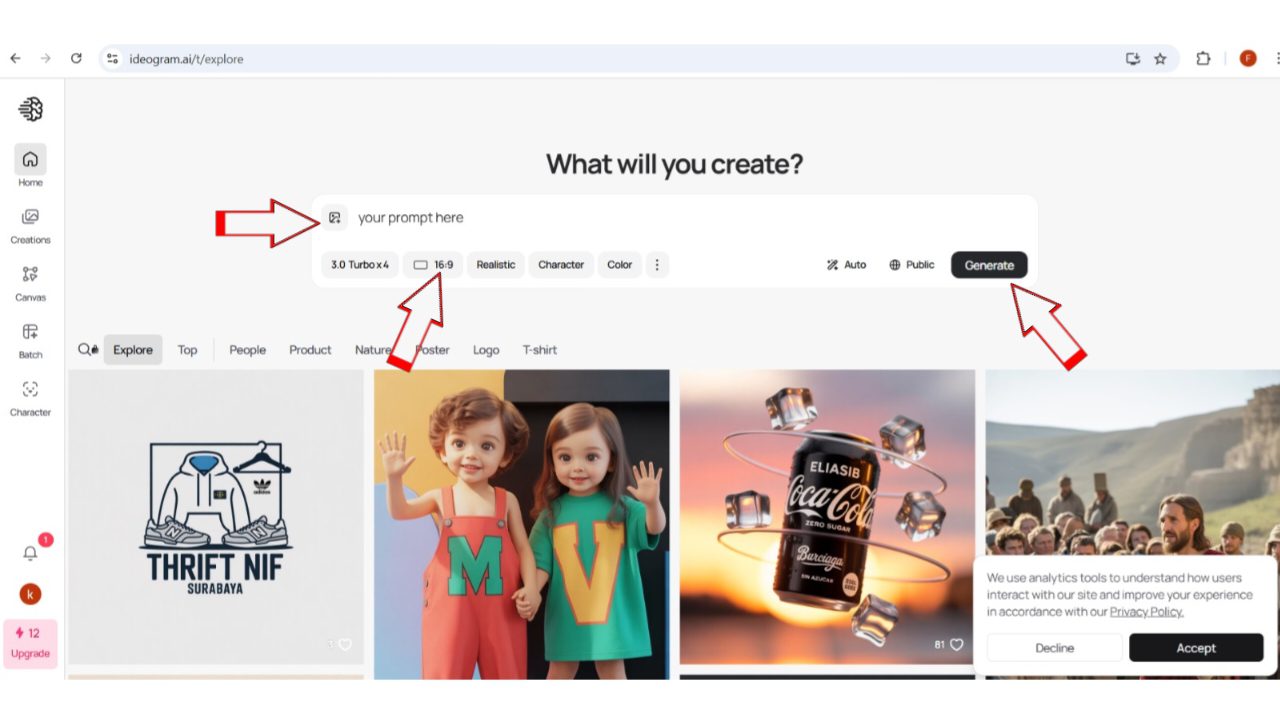
once you copy the prompt from chat gpt, now open this website “Ideogram” This website is a free Ai image generator website. Here all you have to do is just past that prompt you copied from chat gpt then below that past bar you will get some settings you have to select the image dimensions according to your need like if you want thumbnail for you tube then you have to select 16:9 if you want for Instagram reel then you have to choose 9:16, select any according to your preferences, once you done with settings then hit run button, with in few seconds your thumbnail will be generated based on your internet speed.
Here one thing you have to keep in mind is this website will give you only 10 credits per day and each image generation takes 4 credits, that means you can generate two thumbnails per day which is sufficient for many but if you need more you can consider there paid plan as well.
3) Customizing the Thumbnail with Your Face
Once the generation process is complete it will give you four samples, you can choose which one suits for your video.
you might be thinking that the man in the thumbnail is not you, worry not i have to solution for that as well. All you have to do now is again go to chat gpt then upload that thumbnail which you just have generated and along with that upload any of your image as well and give this prompt “replace the man in the first image with the second image man” then hit run, After 1 or 2 minutes the chat gpt will do its job then give you the final image according to the prompt you have given.
This way you can generate high quality and eye catchy thumbnails using AI in just few minutes.
Also Read This Article: The Best Screen Recorder For Android (2025 Tested and Reviewed)
Conclusion
By following above step by step process and using ChatGPT for idea generation and Ideogram for creation, you can generate high quality and eye catching thumbnails in minutes and also remember add some your own personal touch that would make your thumbnail look more unique and eye catchy. Embrace these AI tools to work smarter, save time and give your videos the click worthy cover they deserve.